
Introduction
Finding reliable information can be challenging PebbleGo for young students, especially when they are still learning how to read, understand new words, and conduct research. General search engines often display complicated information, advertisements, and websites that may not be suitable for children. PebbleGo addresses this challenge by providing an educational digital environment designed specifically for elementary school learners.
PebbleGo is a curriculum-connected learning platform developed by Capstone. It offers child-friendly nonfiction articles covering subjects such as animals, science, health, biographies, and social studies. Its content combines written information with audio narration, images, videos, vocabulary support, and interactive activities. These features help students understand topics at an appropriate reading level while developing important literacy and research skills.
The platform is mainly intended for students in kindergarten through the early elementary grades. An additional product, PebbleGo Next, extends the learning experience for students in higher elementary grades. Together, these resources support classroom teaching, independent exploration, and research projects.
Quick Information Table
| Feature | Details |
|---|---|
| Platform Name | PebbleGo |
| Developer | Capstone |
| Platform Type | Digital educational learning and research platform |
| Main Audience | Elementary school students |
| Core Age Group | Kindergarten to Grade 2+ |
| Extended Platform | PebbleGo Next |
| PebbleGo Subjects | Animals, Biographies, Health, Science, Social Studies |
| PebbleGo Next Subjects | Animals, Biographies, Health, Indigenous Peoples’ History, Science, Social Studies, States |
| Languages | English and Spanish content |
| Main Features | Articles, audio narration, videos, images, games, vocabulary support |
| Access | School or district subscription |
| Main Purpose | Reading development, research, and subject learning |
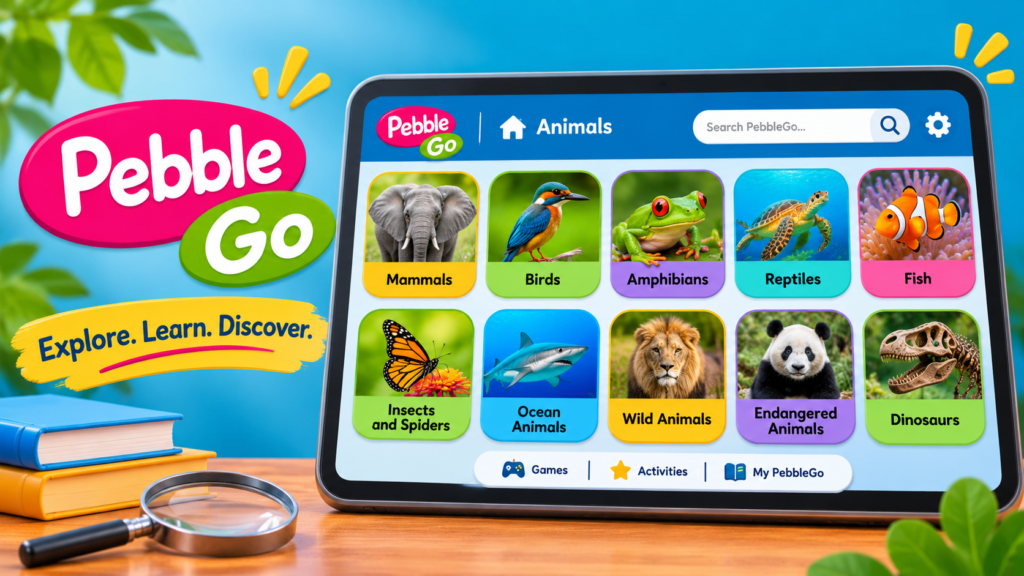
What Is PebbleGo?
PebbleGo is an online educational resource that helps young learners discover information through structured, age-appropriate content. Rather than requiring children to search through the entire internet, it presents information in organized subject areas with simple navigation.
The platform focuses on nonfiction learning. Students can explore real-world subjects, read short articles, listen to narration, understand unfamiliar vocabulary, and use additional learning materials to review what they have discovered.
PebbleGo is designed to make early research less complicated. Its visual layout and guided navigation help students find information even when they are not confident readers. Children can explore topics independently or use the platform with guidance from teachers and librarians.
Capstone developed PebbleGo as part of its wider educational publishing and digital learning offerings. The company also provides books, interactive eBooks, and other classroom resources that can complement the platform.
Main Subjects Available on PebbleGo
PebbleGo organizes its educational content into five primary modules. Each module covers a different area of knowledge and gives students opportunities to explore related topics.
1. Animals
The Animals module introduces children to different species and their environments. Students can discover information about mammals, birds, reptiles, insects, marine animals, and many other living things.
Articles may explain an animal’s appearance, habitat, diet, behavior, life cycle, and unique characteristics. Depending on the article, students may also find photographs, videos, maps, or recordings of animal sounds.
This module can support lessons about biodiversity, ecosystems, animal adaptations, and the natural world. It also encourages curiosity by allowing children to explore creatures they may have encountered in books, classrooms, or everyday life.
2. Science
The Science module helps students understand scientific ideas through accessible explanations. Topics can introduce natural processes, physical science, Earth science, and other basic scientific concepts.
Instead of presenting complex technical explanations, the content is structured to help younger readers understand important ideas gradually. Related visuals and videos can make abstract concepts easier to understand.
Teachers can use these articles to introduce a subject before a lesson, support classroom discussions, or give students a starting point for simple research assignments.
3. Biographies
The Biographies module introduces students to important people from different periods and areas of life. These may include scientists, artists, historical figures, leaders, athletes, and other individuals who have made meaningful contributions.
Students can learn about a person’s background, achievements, experiences, and influence. Biographical content can also help children understand historical events through the lives of the people connected to them.
This module is useful for reading assignments, history lessons, and projects that require students to research a particular person.
4. Health
The Health module introduces age-appropriate information about the human body, personal well-being, and healthy habits.
Students can explore basic health topics and develop a better understanding of how everyday choices relate to their well-being. The content can support classroom conversations about the body, hygiene, safety, and general health awareness.
The module is intended for educational purposes and should complement, rather than replace, guidance from teachers, parents, and qualified health professionals.
5. Social Studies
The Social Studies module helps children explore communities, cultures, history, geography, and the wider world.
Students can learn how people live in different places, how communities function, and how historical events have shaped society. These subjects help develop cultural awareness and introduce important ideas about citizenship and human experiences.
The module can also support classroom discussions about traditions, geography, community roles, and connections between people and places.
What Is PebbleGo Next?
PebbleGo Next is an extended learning platform designed for students in approximately Grades 3–5 and above. It builds on the original platform by providing content suited to learners who are ready for more developed reading and research experiences.
It includes seven subject modules:
- Animals
- Biographies
- Health
- Indigenous Peoples’ History
- Science
- Social Studies
- States
The additional content helps students explore topics in greater detail as their reading abilities and subject knowledge develop.
For example, a younger student might begin by reading a simple article about an animal in PebbleGo. A more advanced learner can use PebbleGo Next to explore related information, compare topics, and develop a more detailed research project.
Both platforms provide English and Spanish content, helping schools support bilingual classrooms and students with different language-learning needs.
Important Features of PebbleGo
PebbleGo offers several features that make it useful for elementary education. These tools are designed to help students access information, understand what they read, and use their knowledge.
Read-Aloud Audio
One of the platform’s most useful features is its read-aloud function. Students can listen to an article instead of relying entirely on written text.
As the narration plays, the words are highlighted to help learners follow along. This combination of listening and reading can support pronunciation, reading fluency, and comprehension.
The narration speed can also be adjusted. Students can choose a playback speed between 0.7x and 1.5x, depending on their needs and preferences.
Vocabulary and Glossary Support
Educational articles often contain unfamiliar words. PebbleGo helps students understand these terms through built-in vocabulary support.
Highlighted words can provide glossary definitions, and students can listen to the pronunciation of selected terms. This makes it easier to understand new concepts without leaving the article.
Vocabulary support is especially helpful for early readers and students learning English.
Visual Search and Simple Navigation
Young children may not always know the correct spelling of a topic or how to search for it. PebbleGo offers visual navigation that allows students to move through modules, categories, and subcategories.
Students can select a subject, choose a category, and open an article using a guided browsing process. This approach makes the platform easier to use for children who are still developing their reading skills.
Keyword Search
Students who already know what they want to research can use the search feature to find relevant articles.
The search tool can look across article text, not only article titles. It also provides suggested results as students type. Search results can be filtered or sorted by subject, alphabetical order, or relevance.
This feature helps learners locate information more efficiently and discover related subjects.
Videos and Images
Many articles include visual resources that help explain the topic. Photographs and illustrations give students a clearer idea of what they are reading, while videos can provide additional context.
Some animal articles also include maps showing where particular species are found. Certain articles offer authentic animal sounds, helping students connect written information with real-world examples.
Related Articles
The Read More feature directs students toward related content. It encourages them to continue exploring instead of stopping after reading a single article.
For example, a student researching one animal may discover information about its habitat, food sources, or related species. This can help develop broader subject knowledge and more effective research habits.
Printable Activities and Article Resources
Many articles provide additional resources that students and teachers can use after reading. Depending on the topic, these may include:
- Printable activities and worksheets
- Article downloads in PDF format
- Ready-to-use article citations
- Related educational videos
- Maps and timelines
- Additional learning materials
These resources make it easier to turn online reading into classroom activities, written assignments, and research projects.
PebbleGo Playground: Learning Through Exploration
PebbleGo Playground adds interactive experiences for younger learners. It is designed to encourage children to explore high-interest subjects while becoming more comfortable with digital learning.
Available mini-modules include Sports, Food Around the World, and Mythical Creatures.
Playground also includes activities that connect learning with creativity and entertainment. Depending on the activity, students may explore jokes, answer Would You Rather questions, create puppet stories, print trading cards, or follow simple recipes.
These activities encourage children to engage with information in different ways. They can also help make reading feel more enjoyable for students who benefit from interactive learning experiences.
Schools subscribing to all five main PebbleGo modules receive access to PebbleGo Playground as part of the offering described in the platform’s educator guidance.
How Teachers Can Use PebbleGo in the Classroom
PebbleGo can support different teaching methods, from whole-class instruction to independent student research.
Introducing New Topics
Teachers can use an article to introduce a subject before beginning a lesson. For example, an article about weather, animals, or historical figures can provide background information and help students become familiar with important vocabulary.
Supporting Reading Development
The combination of written text, narration, and word highlighting provides different ways to access information. Teachers can use these features to support students who need additional reading practice or help understanding unfamiliar words.
Organizing Research Projects
Students can use PebbleGo articles as starting points for basic research assignments. They can gather facts, review related articles, and use available citation tools when preparing their work.
Encouraging Classroom Discussions
Features such as Question of the Day can help teachers start conversations around a subject. Students can respond to a question, consider different opinions, and support their ideas with information from the articles.
Providing Differentiated Learning
Not every student learns at the same pace. Teachers can combine reading, listening, printable activities, and visual materials to provide different ways of engaging with a topic.
Educator resources also include lesson plans, graphic organizers, printable materials, and training resources that can help teachers plan activities around the platform.
How to Access PebbleGo
PebbleGo is generally provided through school or district subscriptions rather than unrestricted individual access.
Students and teachers can usually sign in through the platform’s login page using credentials supplied by their school. Schools may also provide access through supported single sign-on systems.
Supported integration options include:
- Clever
- ClassLink
- Google Classroom
The exact access method depends on the school’s subscription and account setup.
Can Students Use PebbleGo at Home?
Yes. Students can access PebbleGo outside school when their institution provides the necessary subscription and login details.
Families may need to use the username and password supplied by the school or sign in through the school’s supported access system. If a student cannot find their login information, contacting the school librarian or PebbleGo administrator is usually the best option.
Is PebbleGo Free?
PebbleGo is primarily a subscription-based educational resource for schools and districts. Access depends on the institution’s subscription and the modules it has purchased.
Not every school necessarily has access to every module or product in the wider PebbleGo suite. Students should check with their teacher or school librarian to find out which resources are available.
Safety, Accessibility, and Student Support
A learning platform for young children needs to be easy to navigate and suitable for different learning needs. PebbleGo includes several design and accessibility features intended to make its content more accessible.
These include readable text, keyboard navigation, screen-reader support, alternative text for meaningful images, video transcripts, and read-aloud audio.
The platform also states that its accessibility work is guided by recognized standards, including WCAG 2.2 Level AA, Section 508, and EN 301 549. Accessibility improvements are ongoing, and schools can review the relevant accessibility documentation when evaluating the platform.
PebbleGo also describes itself as COPPA-compliant and designed to align with school and district privacy requirements. These measures are relevant to institutions evaluating digital resources for children.
Schools should still review the platform’s current privacy documentation and their own technology policies before introducing any educational service.
Latest PebbleGo Updates and Developments
PebbleGo continues to expand its content and improve the learning experience. One notable development during 2026 was the addition of new articles to PebbleGo Next.
New animal articles included topics such as whale sharks, bumblebees, fireflies, Arctic foxes, and Bengal tigers. The Biographies module also received additional articles about individuals from sports, history, and the arts.
Social Studies received new topics covering subjects such as how smartphones and video games are made, national parks, and types of government. The Indigenous Peoples’ History module also gained articles about the Taíno, Kickapoo, and Mohican communities.
Another important development was the introduction of PebbleGo Playground. Its mini-modules provide younger learners with more opportunities to explore subjects through interactive activities.
The platform also offers content management options that allow school administrators to control which modules and topics are visible to students. New articles are made available to subscribers as part of the platform’s content updates.
These developments show how PebbleGo is expanding beyond a collection of reading articles into a broader digital learning environment.
Benefits of Using PebbleGo
PebbleGo offers several potential benefits for students, teachers, and school libraries.
Age-appropriate information: Content is designed for elementary learners, making it easier for children to explore subjects without beginning with overly complicated material.
Improved reading engagement: Audio narration, word highlighting, and vocabulary definitions provide additional reading support.
Early research skills: Students can practice searching for information, exploring related articles, and collecting facts for assignments.
Multilingual learning: English and Spanish content can support bilingual classrooms and language development.
Interactive experiences: Videos, games, printable activities, and creative tools offer different ways to engage with educational topics.
Classroom flexibility: Teachers can use the platform for group lessons, small-group activities, and independent learning.
Convenient digital access: Students can use supported devices and school-provided accounts to access learning resources in different settings.
Limitations to Consider
Although PebbleGo offers useful educational features, it is important to understand what the platform is designed to do.
First, its content is primarily aimed at elementary learners. Older students who need advanced academic research, detailed scientific studies, or university-level sources may require additional resources.
Second, access depends on a school or district subscription. Students without an active institutional account may not be able to use the full platform.
Third, the availability of particular modules and activities depends on the subscription. A school may not have access to every product or feature.
Finally, students should learn that one educational platform is not a substitute for evaluating multiple sources. As they progress to higher grades, teachers should introduce additional research methods, source evaluation, and more advanced reference materials.
Frequently Asked Questions About PebbleGo
1. What is PebbleGo used for?
PebbleGo is used to help elementary students read, explore nonfiction topics, and develop basic research skills. It provides educational articles, audio narration, vocabulary support, videos, and interactive learning activities.
2. What age group is PebbleGo designed for?
The original PebbleGo platform is designed mainly for kindergarten through Grade 2 and nearby early-learning levels. PebbleGo Next extends the experience for students in approximately Grades 3–5 and above.
3. What subjects are available on PebbleGo?
The five main modules cover Animals, Biographies, Health, Science, and Social Studies. PebbleGo Next adds Indigenous Peoples’ History and States to its seven-module collection.
4. Does PebbleGo support Spanish?
Yes. The platform provides English and Spanish content across its main PebbleGo and PebbleGo Next modules, supporting bilingual learning environments.
5. Can students listen to articles?
Yes. PebbleGo includes read-aloud audio that highlights words as the narration plays. Students can also adjust the playback speed to suit their reading needs.
6. Can students use PebbleGo at home?
Yes, if their school or district subscription allows home access. Students generally need school-provided login credentials or an approved sign-in method.
7. Is PebbleGo free for everyone?
No. Full access is generally provided through paid school or district subscriptions. The modules available to students depend on the institution’s subscription.
8. What is the difference between PebbleGo and PebbleGo Next?
PebbleGo focuses on younger elementary learners, while PebbleGo Next offers extended content for students who are ready for more developed reading and research activities.
9. Does PebbleGo provide activities for teachers?
Yes. Educators can find lesson plans, printable activities, graphic organizers, content maps, training materials, and other classroom resources.
10. Who developed PebbleGo?
PebbleGo is developed and published by Capstone, an educational content provider that also offers print books, digital books, and other learning resources.
Conclusion
PebbleGo is a digital educational platform that makes nonfiction reading and early research more accessible to elementary school students. Its organized subject modules, child-friendly navigation, read-aloud audio, vocabulary support, videos, and interactive activities create multiple ways for children to discover information and build knowledge.
The addition of PebbleGo Next gives older elementary learners opportunities to explore more detailed topics, while PebbleGo Playground introduces playful experiences for younger students. Teachers can also use its printable resources, classroom activities, and integration options to connect digital learning with everyday instruction.
Although access depends on school or district subscriptions, PebbleGo can be a useful resource for building reading confidence, encouraging curiosity, and developing the research habits students will need as they progress through their education.

